Posts

Lab-1 Challenges

Image
Introduction: In this lab, we explored the 6502 assembly language using an online emulator. The primary goal was to understand how to manipulate the bitmapped display, calculate the performance of our code, and optimize it for faster execution. We started by filling the entire screen with a solid color (yellow) and then modified the code to experiment with different colors, patterns, and performance optimizations. Finally, we tackled some optional challenges to further deepen our understanding of the 6502 assembly language and its capabilities. Challenges: Challenge 1: Set all of the display pixels to the same color, except for the middle four pixels, which will be drawn in another color. To achieve this, we need to modify the original code to fill the entire screen with one color and then change the color of the middle four pixels. The middle four pixels are located at the center of the screen, which can be calculated based on the screen resolution.     lda #$00    ...

Lab-1 Experiment: Exploring Visual Effects with 6502 Assembly

Image
  Introduction In this section of Lab 1, we will experiment with the original bitmap code to observe how small changes in the assembly instructions can create different visual effects on the bitmapped display. We will learn more about how the 6502 processor manages data manipulation and how these operations translate into visual output by changing the code and examining the outcomes. We can investigate the connection between memory addressing, assembly instructions, and the final graphical display with the aid of these experiments. Experiment 1: Adding "tya" Instruction Objective:  Add the "tya" instruction after the loop: label and before the "sta ($40),y" instruction. Observe the visual effect and explain why it occurs. Observation: The screen displays a gradient of colors instead of a solid yellow. The gradient repeats every 16 pixels horizontally. Explanation: The TYA instruction transfers the value of the Y register (which ranges from 0 to 255) into t...

Lab-1: Exploring 6502 Assembly

Image
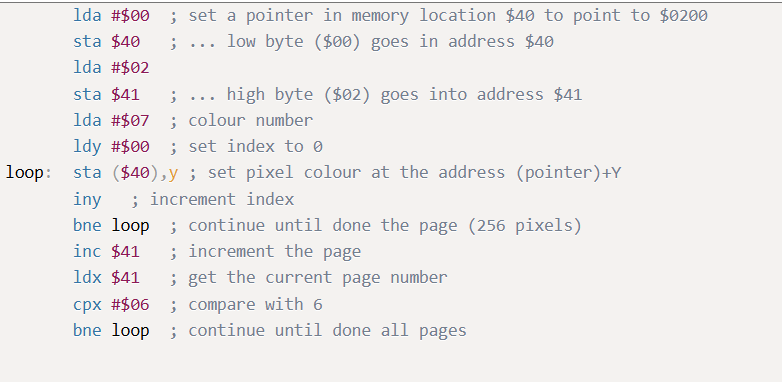
Introduction This lab focuses on using the 6502 emulator to understand assembly language by manipulating a bitmapped display. The goal is to fill the screen with colors, optimize the code for better performance, and experiment with various modifications to observe visual effects. Through this lab, we learn about addressing modes, loop structures, and how execution time and memory usage are calculated in a 6502-based system. Performance Analysis We used an online 6502 emulator since physical hardware wasn't available. The lab required analyzing and manipulating an initial code sample to achieve specific objectives. Here's the original code: At first glance, this sequence of instructions seems daunting. However, once broken down, it becomes quite logical. The code fills a 1024-pixel bitmap display with yellow (color code #$07) by iterating through all four 256-byte pages of the display. Below is the output from the emulator after running this code: Task 1: Calculate Execution Tim...